
Loading page.
Web-based queuing for NUD Treasury: kiosk ticketing, staff windows, and a PWA with real-time updates
Context
QuickQ was built around a real campus service bottleneck: the NUD Treasury Office queue. Treasury transactions are time-sensitive for students because payment, assessment, and document-related concerns often affect the rest of their school workflow. When many students are waiting at the same time, the experience is not only about queue length; it is about uncertainty. Students want to know whether their ticket is moving, whether they missed a call, and which window is currently serving.
The office side has a different pressure. Staff need to keep service windows moving while staying fair, consistent, and clear about which ticket is being called or completed. A queue that depends too much on verbal calls, manual checking, or staff memory becomes harder to coordinate during peak periods, especially when multiple windows are active and students continue asking for status updates.
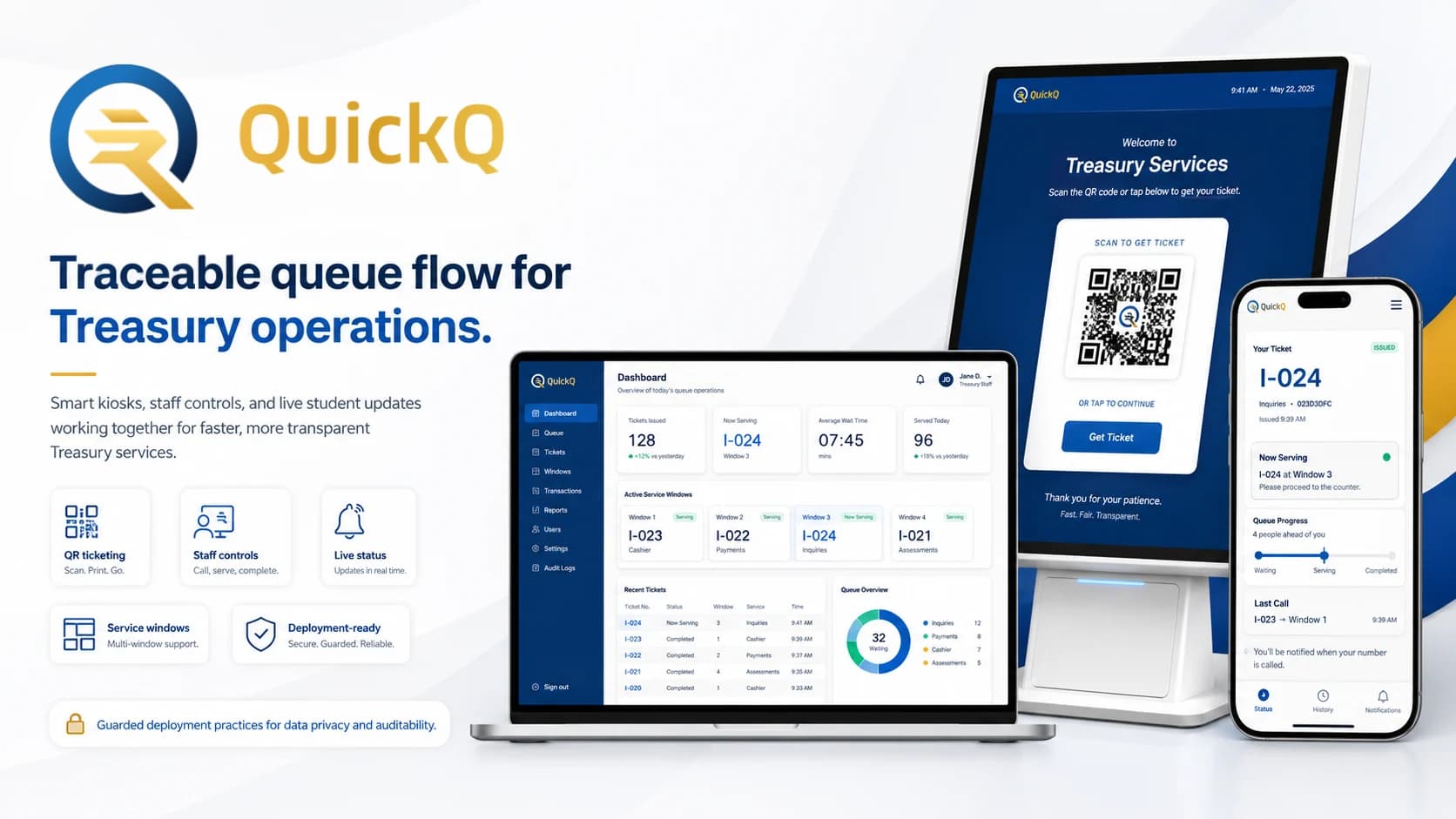
That context shaped QuickQ as an operations system, not just a digital number dispenser. The product needed to connect three surfaces: a kiosk that creates tickets, a staff console that controls service windows, and a student-facing PWA that shows live queue status. The value of the system comes from making the same queue state visible to the people waiting and the people serving.
Problem
The main problem was the lack of shared queue visibility. Students could be physically present but still unsure about their position, the active ticket, or whether they should stay near the office. That uncertainty creates repeated questions, crowding near the service area, missed turns, and frustration that staff have to absorb while still handling transactions.
For staff, the risk was operational consistency. Calling a ticket, confirming that a student arrived, completing a transaction, skipping a no-show, or issuing a last-call alert are small actions individually, but together they define the fairness and reliability of the queue. If those states are not tracked clearly, the office has to rely on informal memory and coordination instead of a visible service workflow.
The problem became more serious because queue actions can happen close together. If multiple staff windows are serving at the same time, the system has to prevent duplicate handling and confusing status changes. QuickQ needed to treat queue state as something protected and synchronized, not as a simple list that any screen could update casually.
Solution
QuickQ solves the workflow by turning ticket creation, staff handling, and student status checking into one connected flow. A student starts at the kiosk, receives a QR-backed ticket, and enters the queue as a traceable record. From there, staff can work through a service-window console that supports calling, confirming, completing, skipping, or escalating tickets through last-call handling.
The student-facing side is a PWA that makes the queue visible without requiring students to constantly ask for updates. Instead of treating the ticket as a static number, the system can show movement as staff actions happen. Live updates are delivered through server-sent events so queue and ticket state can change in near real time across the kiosk, staff console, and student view.
The product decision was to keep the workflow practical for a campus office. QuickQ does not try to become a full service-management platform. It focuses on the moments that matter most in a queue: creating the ticket, calling the next person, confirming attendance, completing service, handling no-shows, and notifying students when their turn needs attention.
My role
I served as the project manager, system architect, and full-stack developer for QuickQ. The team had seven contributors across frontend, backend, QA, and project coordination, so my responsibility was not only to code features but to keep the technical direction, scope, and delivery process coherent over the 11-week build from August 4 to October 19, 2025.
On the product side, I helped translate the Treasury Office queue into system behavior: what a ticket is, what a service window does, what statuses need to exist, how staff actions should move the queue forward, and how students should understand their place in the flow. This meant thinking through the operational states before treating them as UI screens.
On the engineering side, I worked across the backend, database, deployment, security, release, and operational guardrails. That included designing the queue-handling logic, working with PostgreSQL concurrency concerns, preparing Docker Compose deployment, configuring Cloudflare Tunnel ingress, guarding CORS, adding health endpoints, and keeping backup, rollback, and smoke-check practices part of the delivery plan.
Product workflow
The workflow begins at the kiosk. A student creates a ticket and receives a QR-based reference that connects them to the queue. That ticket enters the system with a waiting state, making it available to staff windows instead of leaving the queue as an informal line or a disconnected printed number.
From the staff console, a service-window operator can call the next ticket, confirm that the student arrived, mark the ticket as being served, complete the transaction, or handle cases where the student does not respond. These actions are important because they turn staff decisions into visible queue events. The queue is no longer just a sequence of numbers; it becomes a set of state changes that can be followed and reviewed.
On the student side, the PWA reflects the queue as it changes. A student can check the live status of their ticket and understand whether they are still waiting, being called, or need to respond. Push notification support and SMS fallback were included for last-call scenarios, where the system needs another way to reach a student before the ticket is skipped or marked as missed.
System architecture
QuickQ uses React with Vite for the client surfaces, Node.js with Express for the backend, PostgreSQL 16 for durable queue records, and Knex for database access. The architecture is organized around shared queue state: the kiosk creates tickets, the staff console changes ticket status, and the PWA receives live updates from the same backend source.
Server-sent events handle the real-time layer. SSE was a practical fit because the queue mostly needs server-to-client updates: when a ticket is called, completed, skipped, or updated, connected clients can receive the new state without repeatedly polling the backend. This keeps the student and staff views aligned while staying simpler than a heavier bidirectional realtime setup.
The most important backend decision was protecting ticket selection under concurrent staff actions. PostgreSQL row-level locking with `SKIP LOCKED` reduces the risk that two staff windows claim or serve the same ticket when actions happen close together. That detail matters because a queue system can look polished on-screen but still fail operationally if the underlying state can be double-served or updated out of order.
The deployment structure also mattered. QuickQ was prepared with Docker Compose, health endpoints, post-deploy smoke checks, Cloudflare Tunnel HTTPS ingress, guarded CORS, backup steps, and rollback notes. Those pieces make the system feel closer to an operational pilot than a classroom-only prototype because they address how the app starts, fails, recovers, and stays reachable in a real environment.
Current status
QuickQ was built as a staged pilot focused on the Treasury Office workflow. The project was scoped around a concrete 11-week delivery window, with the goal of proving that kiosk ticketing, staff window operations, live status, and notification support could work together as one queue-management system.
The current value of the project is not only in the screens that were built, but in the operational thinking around deployment and use. Health checks, backups, rollback notes, guarded ingress, and smoke checks were treated as part of the project because a queue system affects people in the moment. If the system is unavailable or inconsistent during service hours, the workflow immediately falls back into confusion.
The project is ready to be discussed as a pilot-oriented system: implemented enough to demonstrate the queue flow, structured enough to explain reliability decisions, and scoped enough to expand later into analytics, service-type configuration, staffing patterns, and longer live validation.
Outcomes
QuickQ produced an end-to-end queue workflow that connects ticket creation, staff service-window handling, student-facing live status, and notification support. Even without claiming final institutional metrics, the deliverable is concrete: the project models how a campus office can move from a manually coordinated line into a traceable service queue.
The strongest technical outcome is that the system accounts for reliability at the point where it matters. Real-time updates make queue movement visible, while database locking protects against duplicate ticket handling. Deployment guardrails make the system easier to run and recover. Together, those decisions show that QuickQ was designed around operational trust, not only interface presentation.
The project also created a reusable pattern for other campus service offices. Any workflow that depends on people waiting, staff calling, and status uncertainty could use the same basic model: generate a ticket, expose live status, protect staff actions, notify users when needed, and keep the service process clear enough to manage under pressure.
Reflection
QuickQ taught me that queue systems are emotional systems. From a technical perspective, a queue is a set of records and state transitions. From a user perspective, it is waiting, uncertainty, and the fear of missing a turn. That changed how I thought about the product: the goal was not only to move tickets faster, but to make the waiting experience more understandable.
The project also made reliability feel very practical. A small bug in a normal interface can be annoying, but a broken queue state can affect the fairness and flow of a real office. That is why details like row-level locking, health checks, backup steps, and rollback notes mattered. They were not extra technical polish; they were part of making the workflow dependable.
As project manager and architect, I also learned how much coordination matters when a system crosses frontend, backend, database, QA, deployment, and real users. QuickQ pushed me to think beyond feature completion and toward release readiness: what needs to be true for staff to trust the system, for students to understand it, and for the team to support it if something goes wrong.